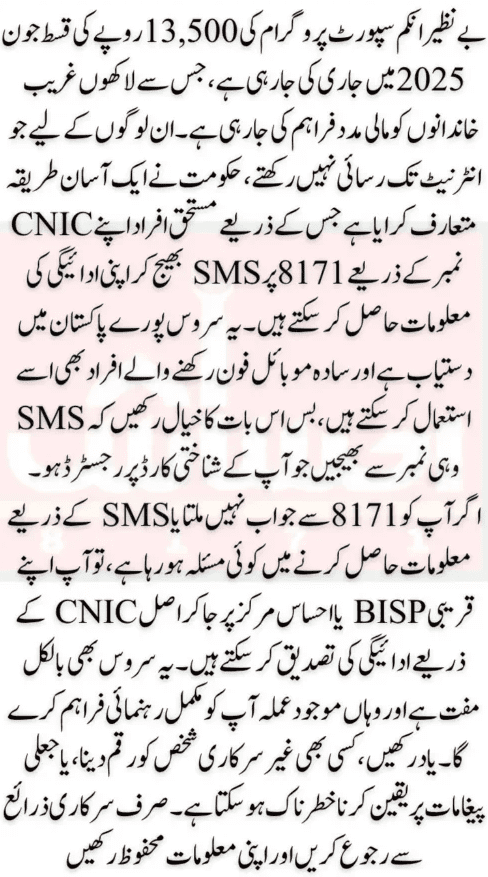
Many people across Pakistan are currently receiving a new installment of Rs. 13,500 from the Benazir Income Support Program (BISP) under the Benazir Kafalat Program for 2025. This financial help is provided to support low-income women and families. But not everyone knows how to check if they have received their payment or not. Especially those living in villages or remote areas often do not have access to the internet or smartphones.
To solve this problem, the government has created a simple SMS method that allows you to check your BISP payment without using the internet. All you need is a basic mobile phone, a registered SIM card, and your 13-digit CNIC number. This method is easy, quick, and works on any mobile phone, whether it’s a keypad phone or a smartphone.
Let’s understand how to use this BISP SMS method step-by-step, why it is important to use a registered number, how to solve common problems, and what type of SMS replies you may receive.

What is the BISP SMS Payment Tracking Method?
The BISP SMS method is a service that lets you check your payment status by simply sending your 13-digit CNIC number through an SMS to the official number 8171. This method was made especially for those people who don’t have internet access or who don’t know how to use apps or websites.
Instead of visiting a BISP office or using BISP web portal, you can just send one SMS and receive a message in return that tells you about your payment status. This SMS reply will inform you whether your Rs 13,500 payment is approved, is still under review, if you are not eligible, or if you need to complete your registration.
This service is available all over Pakistan and can be used 24 hours a day, 7 days a week. But sometimes during peak hours, when many people are sending SMS at the same time, the system may take longer to respond. So, it is advised to wait or try again after some time if you don’t receive an immediate reply.
The best part of this method is that no internet, no Android phone, and no app is needed. Just one simple SMS can give you all the information you need about your BISP payment status.
Step-by-Step Guide: How to Check BISP Rs. 13,500 Payment via SMS
Here is a very simple and complete guide that explains how you can check if your BISP Rs. 13,500 payment has arrived or not. Just follow these four easy steps:
Step 1: Open Your Mobile’s SMS Application
Open the Messages or SMS app on your mobile phone. This can be done on any kind of mobile phone, even if it is a simple feature phone.
Step 2: Type Your 13-Digit CNIC Number
Now, carefully type your Computerized National Identity Card (CNIC) number. Make sure:
- It is typed without dashes or spaces.
- It is 13 digits long.
Example: If your CNIC is 35202-1234567-8, just type it as: 3520212345678
Step 3: Send the SMS to 8171
After typing your CNIC, send it to the number 8171. This is the official BISP SMS number.
Step 4: Wait for the Reply
Once you send the SMS, wait for a few minutes. You will receive a reply SMS from 8171 telling you about your current BISP payment status.
If the system is busy, the reply may take longer, so be patient. If you don’t get any message back, check the common error section below.
Why Is a Registered Phone Number Important?
This is a very important point. The phone number from which you are sending your CNIC to 8171 must be registered under your own name and CNIC. This means that the SIM card must be in your name.
If you use someone else’s SIM or a number not linked with your CNIC, the BISP system may not recognize you and you might:
- Not get a reply at all
- Get an error message
- Face verification problems later
So before using the SMS service, make sure that your SIM card is:
- Registered under your name
- Active and working
- Not blocked or outdated
You can also check your SIM registration status by visiting your mobile service provider (like Jazz, Zong, Telenor, Ufone) or dialing their helpline. If the SIM is not in your name, get it updated before trying again.
Also Read: BISP Stops Payment for Loan Defaulters – Full Guide to Requalify
What Replies You Can Receive from 8171 SMS Service
When you send your CNIC number to 8171, you will receive one of the following official responses from the BISP system. Each message means something specific about your BISP payment:
| SMS Reply | What It Means |
|---|---|
| Approved | Your payment is ready. Visit the nearest payment center or HBL ATM to collect your Rs. 13,500. |
| In Process | Your information is still being checked. Please wait a few days and check again. |
| Not Eligible | You are not currently selected for this program. You may apply again or update your profile. |
| Incomplete Registration | You need to visit the nearest BISP office to update your profile or documents. |
Each reply gives you a clear next step. For example, if it says “Approved,” you can go and collect your money. If it says “Incomplete,” go to your local BISP center with your CNIC.
Common SMS Errors and How to Fix Them
Sometimes people face issues while using the 8171 SMS service. Here are some common problems and how to fix them easily:
1. No Reply from 8171
If you send your CNIC to 8171 and don’t get a reply, check:
- Did you enter the correct 13-digit CNIC?
- Is your SIM registered under your name?
- Is your SIM active?
If all is correct, try again after a few hours.
2. Wrong CNIC Format
Make sure your CNIC number is typed:
-
In 13 digits
-
Without dashes or spaces
Wrong: 35202-1234567-8
Correct: 3520212345678
3. SIM Not Registered
If your SIM is not registered under your CNIC, the system may block or ignore your message. Go to your mobile company’s office and update your SIM registration.
4. Delayed SMS Response
The system might be busy during peak hours. If there is no reply within an hour, try sending the SMS again later in the day.
Also Read: Restore Blocked 8171 BISP Payment | NSER Survey Guide 2025
Alternative Method: Visit a BISP Office to Verify Payment
If the SMS service is not working for you, or if you are still confused about your payment, you can visit the nearest BISP or Ehsaas center. This is another offline method that allows you to:
- Check your payment status
- Complete any missing registration
- Update your CNIC or family data
Make sure you bring your original CNIC with you when visiting the center. The BISP staff will check your records on their system and tell you the exact status of your Rs. 13,500 payment.
Safety Tips While Using the BISP SMS Service
Unfortunately, there are some people who try to cheat innocent BISP beneficiaries by sending fake SMS or calling as fake BISP agents. You must protect yourself by following these safety tips:
- Never share your CNIC or payment details with anyone other than official BISP staff.
- Only use the official 8171 number to check your BISP status.
- Do not pay any person who asks for money in return for “quick payment” or “approval.”
- If you receive a suspicious SMS or call, report it to the BISP helpline immediately.
Only follow official methods and never trust unverified agents, websites, or messages.
Also Read: BISP Budget Increased: Guide to New 2025–2026 Registration
Final Words: Simple, Safe & Helpful SMS System for Everyone
The BISP 8171 SMS service is one of the easiest, fastest, and safest ways to check your Rs. 13,500 payment status for the month of June 2025. Whether you live in a city or a far-off village, you can use your mobile phone to stay updated without leaving your home.
Just remember the key things:
- Use your own SIM card, registered under your CNIC
- Type your CNIC in 13-digit format
- Send it to 8171
- Wait patiently for a clear reply
- Follow the instructions in the message
If you face any issue, you can always visit your nearest BISP center with your CNIC. The system is made to help the public, especially poor women and families who need financial support.
Note: Please note that all the information provided in this post is obtained from official sources and other reliable resources. It is advised not to share your ID card number or mobile phone number here. Thank you for your understanding. We are solely focused on sharing information on ehsaas-porgrams.pk.